
Short answer: Eklipse and Moltum both work with Twitch, Kick and YouTube streams, but they make different things. Eklipse finds the highlights in your gaming streams and turns them into vertical 9:16 clips with captions for TikTok, Shorts and Reels. Moltum edits the whole stream into a long, story-driven YouTube video and makes Shorts from the same recording. If clips are all you post, Eklipse fits that job. If you also want a YouTube episode from each stream, Moltum is built for it.
Want to see the output first? Example edit: a 2h 44m Twitch stream turned into a 20-minute video with one request (source, request, shorts and edit notes included).
What each tool makes
Both tools start from your stream. The difference is what you get back and how much is left for you to do.
Eklipse: vertical highlight clips
Eklipse connects to your Twitch, Kick or YouTube Live channel, scans your streams for the best gameplay moments and exports vertical 9:16 clips with editable, auto-generated captions and templates, ready for TikTok, YouTube Shorts and Instagram Reels. Its Premium Pro plan adds features such as live clipping, a posting companion and custom highlights. Its website does not mention long-form montages or full YouTube videos as an output.
Moltum: a long YouTube episode plus Shorts
Moltum is an AI video editor for long recordings. You paste a Twitch, Kick or YouTube link or upload a file, describe what you want and pick a target length. It cuts waiting screens, menus and dead air, keeps the moments in story order and delivers a long YouTube video, plus vertical Shorts from the same stream. When there's a face cam, Shorts can put it above the gameplay. It edits your own footage and does not generate video.
Side by side
| Eklipse | Moltum | |
|---|---|---|
| Main output | Vertical 9:16 highlight clips | A long YouTube video plus vertical Shorts |
| Sources | Twitch, Kick and YouTube Live (Facebook is also listed) | Twitch, Kick or YouTube link, or a file upload of up to 40 GB |
| Free plan | Free account and an AI preview of one recent stream; exporting needs Premium | Up to 3 videos from 5 hours of source in total, 720p with a watermark, 2 Shorts per video |
| Paid plans | Premium $24.99/month or $179.99/year; Premium Pro $39.99/month or $299.99/year | Creator $29, Pro $59, Studio $149 a month, net + VAT |
| Storage | Clips kept 14 days on monthly plans, 90 days on annual plans | Delivered files kept 30 days on paid plans, 3 days on the free plan |
| Extras for YouTube | Built around clips | Thumbnail, chapters, YouTube description, ad break timestamps, subtitle files |
Eklipse details are from its website and help center as shown on 27 November 2026; Moltum prices are on the pricing page. Both can change, so check before you subscribe.
When Eklipse is the better pick
- You post clips, not long videos. If your plan is daily TikToks and Shorts from your gaming streams, a highlight clipper covers it.
- You want clips found across every stream. Eklipse is built around connecting your channel and pulling highlights from your streams.
- You want help posting. Its Premium Pro plan lists a posting companion; check what it includes for your platforms.
- You want to preview before paying. A free account lets you see the clips it finds in one recent stream.
When Moltum is the better pick
- You want a YouTube episode from each stream. Turning hours of gameplay into a 20-40 minute video means connecting moments in order and keeping the context, not just collecting peaks. That's the edit Moltum makes.
- Chat matters to your content. With Use chat activity too turned on in Rules, moments when Twitch or Kick chat suddenly picks up get priority.
- You want to say what goes in. Write "keep the final boss and the argument with chat, cut the queue", and items that couldn't be done appear under Not applied on the video page.
- You stream with swearing. The profanity filter can bleep or mute swear words before delivery, and can write them with asterisks in captions.
- You want Shorts during the stream. Live mode, on paid plans, records while you're live and turns standout moments into Shorts as the stream goes on; when you wrap up, it can also make the long video from the same recording.
A typical streamer setup with each tool
With a clip tool
You stream, the tool finds highlights, you review the clips, adjust captions and post them. If you also want a long YouTube video, you open an editor, rewatch the stream and build the episode yourself, or skip the long video.
With Moltum
You stream, paste the link and write your request once. The long video and Shorts come back together on the video page, with chapters, a YouTube description and ad break timestamps to copy. You review it, ask for a change with a note if needed, and upload. With auto mode on a paid plan, every new stream from a connected channel is edited automatically.
Which one saves more time?
It depends on where the real work is on your channel. If you only post Shorts, most of the time goes into finding the right moment and framing it vertically, and a clip tool takes over exactly that part. If you also upload long videos, the biggest time sink is rewatching the stream, putting moments in order and fixing transitions and audio. Whichever tool takes that part off your plate saves you the most. Before you decide, think about a week of streams: how many hours of recording, and how much of it becomes a long video or Shorts? That gives you a clearer answer than any price table.
For the manual version of this workflow, see our guide on turning a Twitch stream into a YouTube video.
Doing it with Moltum
Moltum turns a gaming stream into a story-driven YouTube episode and Shorts, following the request you write.
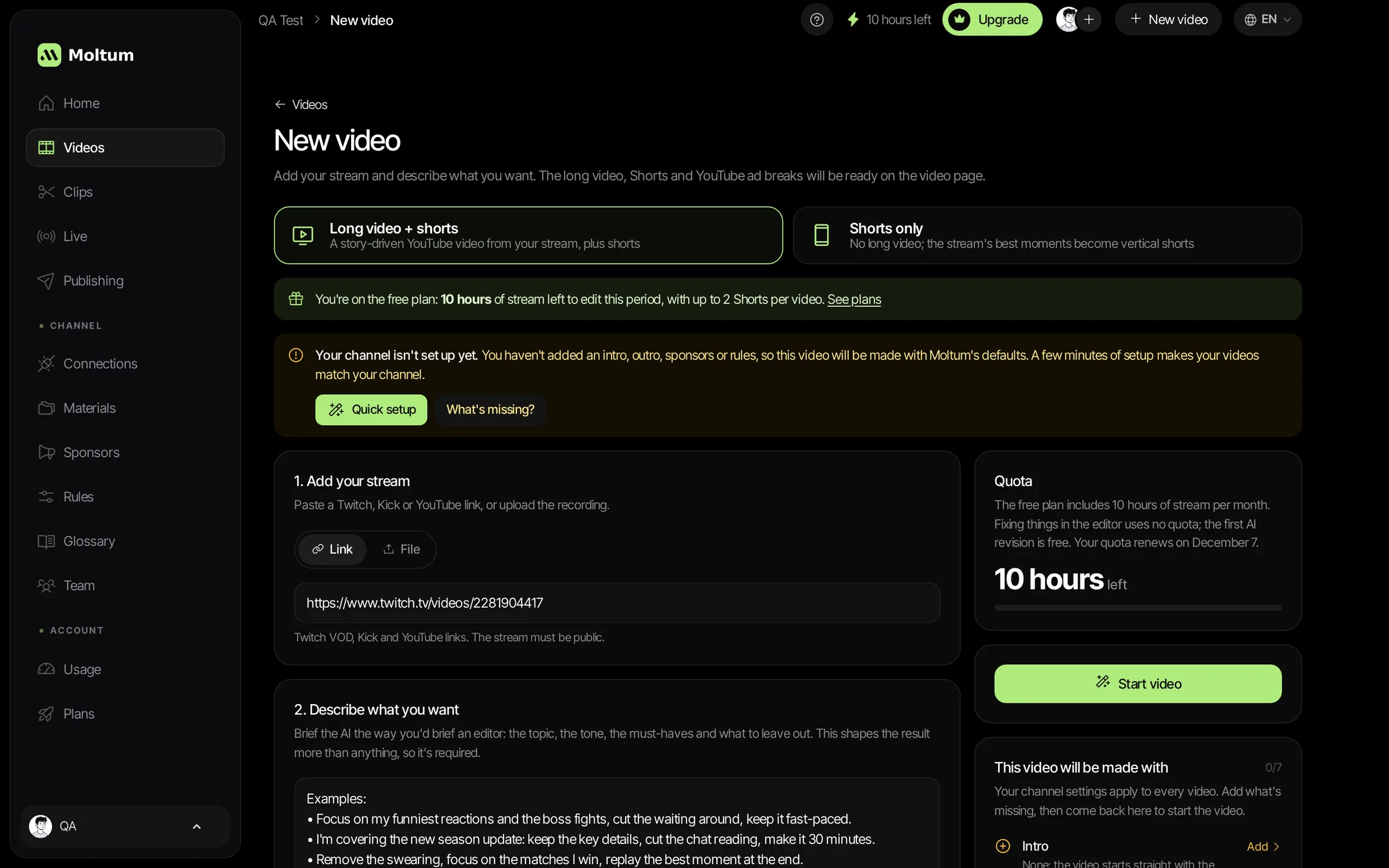
- Your game's words: add characters, places and teammates to the Glossary so captions spell them right.
- Your channel's look: Materials holds your intro, outro, music and transition sounds; Rules sets ad break spacing and Shorts layout.
- Fix one spot: Open in editor lets you change a single cut without a new edit.
Connecting your channel and auto mode are covered in Stream accounts and auto mode.
Frequently asked questions
Is Moltum an Eklipse alternative?
For stream Shorts, yes: Moltum makes vertical Shorts from Twitch, Kick and YouTube streams. The main difference is that Moltum also delivers the long YouTube video in story order, which Eklipse's website does not list as an output.
Can I try either one for free?
Eklipse lets you create a free account and preview the clips from one recent stream; exporting needs Premium. Moltum's free plan gives you up to 3 full videos from 5 hours of source in total, with up to 2 Shorts each, in 720p with a watermark, and no credit card.
Does Moltum work with Kick streams?
Yes. Paste a Kick, Twitch or YouTube link, or upload the file. If you use a link, the video has to be public.
How is usage counted in Moltum?
By the length of the source recording, once per video. A four-hour stream uses four hours of your monthly quota, whatever the length of the finished video; plans include 25, 60 or 180 hours a month.