
Short answer: OpusClip and Moltum both start from a long video, but they make different things. OpusClip turns long videos into short vertical clips and can post them to social platforms. Moltum edits a long recording, such as a stream, podcast or vlog, into a full story-driven YouTube video and makes Shorts from the same recording. If you only need short clips, OpusClip is a natural fit. If you want the long YouTube video too, Moltum is built for that.
Want to see the output first? Example edit: a 2h 44m Twitch stream turned into a 20-minute video with one request (source, request, shorts and edit notes included).
What each tool makes
The main difference is the output, not the AI. Ask yourself what you want to upload after a long recording.
OpusClip: short clips from long videos
OpusClip describes itself as a tool that turns long videos into high-quality viral clips and publishes them to social platforms in one click. Its AI picks moments from your video and rearranges them into a short clip. On its pricing page, clip length options go from under a minute up to 10-15 minutes, and paid plans add things like a virality score, bulk export and social posting. The pricing page does not mention a long-form video as an output.
Moltum: a long YouTube video plus Shorts
Moltum is an AI video editor for long recordings. You paste a Twitch, Kick or YouTube link or upload a file, write what you want in your own words, and choose a target length. It edits the recording into a long YouTube video in story order, cutting the parts that don't move it forward, and makes vertical Shorts from the same recording. It edits your own footage; it does not generate video or B-roll (an AI narrator voice is added only if you ask for one).
Side by side
| OpusClip | Moltum | |
|---|---|---|
| Main output | Short vertical clips | A long YouTube video plus vertical Shorts |
| Free plan | Yes; 60 credits a month per its FAQ, watermarked exports, files expire after 3 days, 9:16 only | Up to 3 videos from 5 hours of source in total, 720p with a watermark, 2 Shorts per video, no credit card |
| Paid plans | Starter $15/month, Pro $29/month, Business custom | Creator $29, Pro $59, Studio $149 a month, net + VAT |
| How usage is counted | Credits | Hours of source recording a month (25, 50 or 150) |
| Extras for YouTube | Built around clips | Thumbnail, chapters, YouTube description, ad break timestamps, subtitle files |
| Finishing elsewhere | Check its site for the export options on your plan | Export to Premiere Pro, DaVinci Resolve, Final Cut or EDL |
OpusClip prices are as shown on its pricing page on 27 November 2026; Moltum prices are on the pricing page. Both can change, so check before you buy.
When OpusClip is the better pick
- Your channel is short-form first. If you post daily Shorts, TikToks and Reels and don't upload long videos, a clip tool does exactly the job you need.
- You want many clips from many videos. Its plans and tools are built around producing and posting clips at volume.
- You want posting built in. OpusClip says it publishes clips to social platforms; check which plan includes social posting.
- Your source isn't a long story. Webinars, talks or interviews where each answer stands on its own often work well as separate clips.
When Moltum is the better pick
- You want a long video people watch start to finish. Turning a four-hour stream into a 30-minute episode is a different job from finding 10 clips: moments need to connect in order, and sentences must not be cut in half. Moltum is built around that edit.
- You want the long video and Shorts together. One upload and one request give you both, from the same recording.
- You want to describe the edit in your own words. Write things like "keep the boss fight, cut the lobby waiting, 20-30 minutes", and anything that couldn't be done shows up on the video page under Not applied, with the reason.
- You want your channel's style every time. Rules, Materials (your intro, outro, music and transition sounds) and the Glossary apply to every video.
- You need a clean audio and caption pass. The profanity filter can bleep or mute swear words, and you can ask for color-coded captions so each speaker gets their own color.
Can you use both?
Yes, and some creators do: a clip tool for a steady stream of short clips and a long-form editor for the weekly episode. If you go this way, keep track of the cost, since you would pay for the same recording twice. Since Moltum also makes Shorts, try it on one stream first and see whether its Shorts cover what you need: they are vertical 9:16 and can have word-by-word captions. If you want more later, the More shorts card on the video page turns moments the AI left out into extra Shorts without using quota (your plan's per-video Shorts limit still applies).
How to test both on the same stream
The easiest way to decide is to try both tools on the same recording. Demo videos always look good; what matters is what happens with your stream.
- Pick an ordinary stream. Not your best day, just an average one. That's the only way to see how each tool handles the slow parts.
- Write your own list first. Note three or four moments that must be in the video, then look for them in both results.
- Give the same request. Write the same sentences to both tools: what to keep, what to cut, how long. Otherwise the comparison isn't fair.
- Watch the Shorts side by side. Does the hook land in the first second, are the captions right, is the face cam in frame? Our guide on hooking viewers in the first seconds of a Short helps here.
- Ask for one fix. Try removing or adding a moment. The easier fixing is, the more time you save in the long run.
Doing it with Moltum
Moltum edits your recording into a long YouTube video and Shorts, based on the request you write.
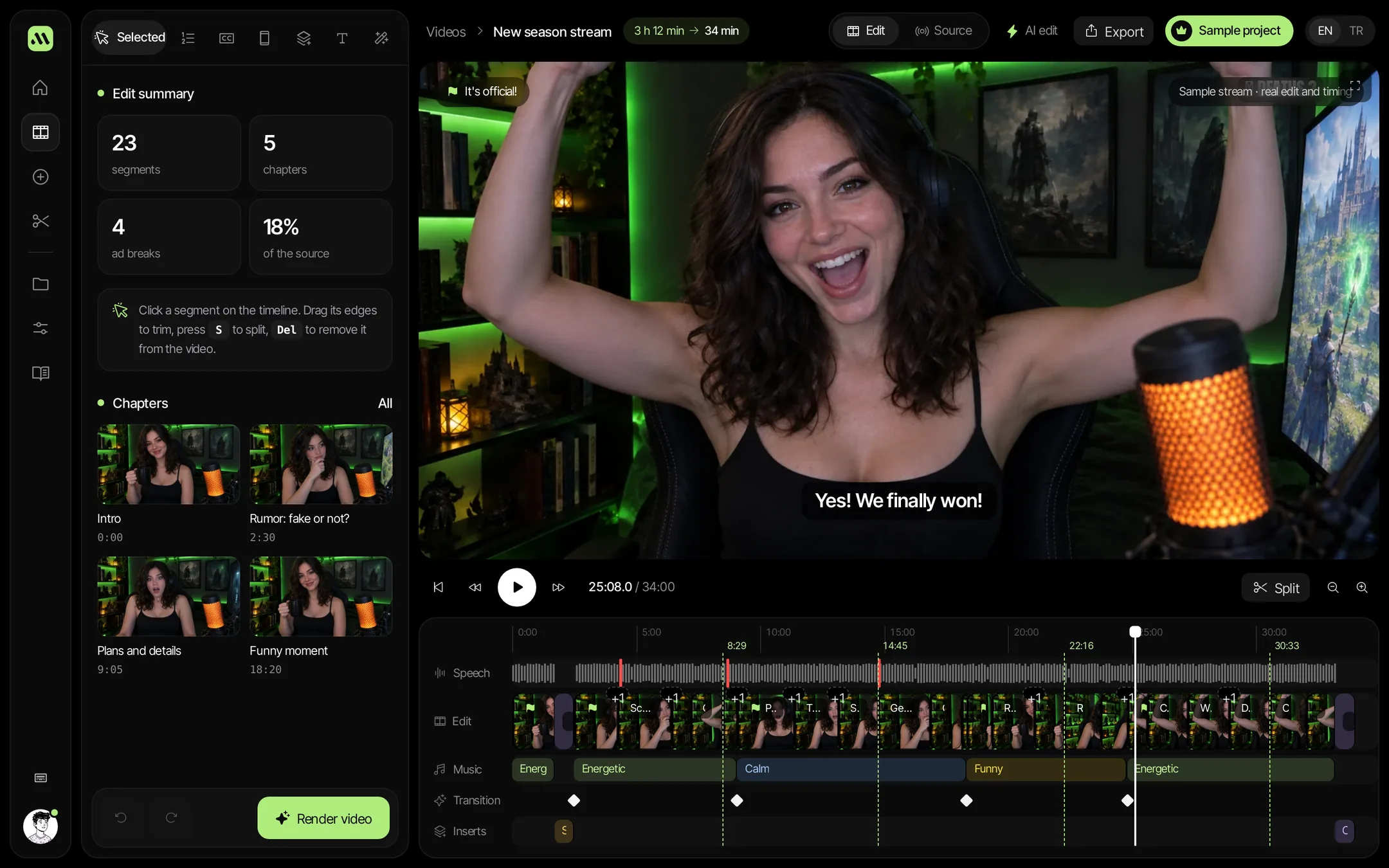
- Start: paste the link or upload the file, write your request and pick Long video + shorts.
- Review: the video page has the long video, Shorts, thumbnail options, chapters and ad break timestamps.
- Fix: write a note and press Regenerate (the first AI revision on each video is free, the first 2 on paid plans), or use Open in editor.
How Shorts are framed and captioned is in Shorts and clips.
Frequently asked questions
Is Moltum an OpusClip alternative?
For Shorts, yes: Moltum makes vertical Shorts from long recordings too. The bigger difference is that Moltum also delivers the long YouTube video in story order, which OpusClip's pricing page does not list as an output.
Which one has a better free plan?
They are built differently. OpusClip's free plan gives monthly credits for clips, with a watermark. Moltum's free plan gives you up to 3 full videos from 5 hours of source in total, with up to 2 Shorts each, in 720p with a watermark. See Plans and quota for Moltum's limits.
Can Moltum edit a stream of several hours?
Yes. Upload a file of up to 40 GB or paste a Twitch, Kick or YouTube link. Your quota counts the source length once; if the stream is longer than what you have left, the part that fits is edited.
Does Moltum use my footage or generate new video?
It only edits your own recording. It does not generate scenes or B-roll, so the result still looks and sounds like your stream. The one exception is an AI narrator voice, added only if you ask for it.