
Short answer: Spikes Studio finds the best moments in your videos and turns them into short clips for social platforms, with captions, auto-reframing, AI B-roll and a scheduler. Moltum edits a long recording, such as a stream, podcast or vlog, into a long YouTube video in story order and makes Shorts from the same recording. If short clips are all you post, Spikes Studio is a good fit. If you want a full YouTube video from your stream as well, Moltum is built for that.
Want to see the output first? Example edit: a 2h 44m Twitch stream turned into a 20-minute video with one request (source, request, Shorts and edit notes included).
What each tool makes
Spikes Studio: clips for every social platform
Spikes Studio describes its AI video editor as finding "the best moments in your videos" and turning them into "scroll-stopping clips for every social platform". Clips get animated captions, auto-reframing with face tracking, music and sound effects, and AI B-roll on PRO+. A social media scheduler posts from one dashboard, and it lists support for 99+ languages.
Moltum: a long YouTube video plus Shorts from one request
Moltum is an AI video editor for long recordings. You paste a Twitch, Kick or YouTube link or upload a file (up to 40 GB), write what you want in your own words and choose a target length. It edits the recording into a long YouTube video in story order and makes vertical Shorts from the same recording, along with thumbnails, chapters, a YouTube title and description, ad break markers and subtitle files. It edits the footage you recorded; it doesn't generate video.
Side by side
| Spikes Studio | Moltum | |
|---|---|---|
| Main output | Short clips for social platforms | A long YouTube video in story order plus vertical Shorts |
| Free plan | Basic: 720p with watermark, auto-captions | Up to 3 videos from 5 hours of source in total, 720p with watermark, 2 Shorts per video, no card |
| Paid plans | PRO+ $32.99 a month (300 min) or $14.09 a month billed yearly; Enterprise $115.99 a month (1,200 min) or $56.34 a month billed yearly | Creator $29 (25 h), Pro $59 (60 h), Studio $149 (180 h) a month, net; a 5% payment fee and VAT are added at checkout |
| Top quality | 1080p on PRO+ | 1080p60 Creator, up to 1440p Pro, up to 4K Studio |
| Posting to social platforms | Social media scheduler with direct posting | You download the files and post them yourself |
| YouTube extras | Clip-focused | Thumbnails, chapters, title and description, ad break markers, SRT/VTT |
| Storage | 7 days Basic, 90 days PRO+, unlimited Enterprise | Delivered files 30 days on paid plans, 3 days on Free |
Spikes Studio details are from spikes.studio and its pricing page as shown on 28 November 2026 (prices as of Nov 2026); Moltum prices and limits are on the pricing page. Both can change, so check before you subscribe.
When Spikes Studio is the better pick
- Your channel is built on short clips. Clip finding, captions and scheduling are the core of the product.
- You want posting built in. Its scheduler posts clips from one dashboard. With Moltum you download the files and post them yourself.
- You want B-roll, music and sound effects on clips. PRO+ adds AI B-roll; Moltum edits your own footage and doesn't add B-roll.
- You pay yearly on a budget. PRO+ billed yearly works out to $14.09 a month.
- You want projects kept longer. PRO+ keeps projects 90 days; Moltum keeps delivered files 30 days on paid plans.
When Moltum is the better pick
- You want a long video that can be watched start to finish. Moltum edits the stream in order, connects the moments and keeps sentences whole, so you get a YouTube episode, not only clips.
- You stream for hours. 300 minutes a month is five hours; Moltum's Creator plan gives 25 hours of source for $29 net, Pro 60 hours.
- You want to steer the edit in words. Write what to keep, what to cut and how long; anything that couldn't be done shows up under Not applied with the reason.
- You start from Twitch, Kick or YouTube. Paste the link; on paid plans auto mode edits each new stream and live mode makes Shorts while you're live.
- You want the YouTube package. Thumbnails, chapters, title, description and ad break markers come with every video, and the cut exports to Premiere Pro, DaVinci Resolve or Final Cut.
Which should you choose?
Choose Spikes Studio if you mainly post short clips and want captions, B-roll and scheduling in one dashboard. Choose Moltum if you want long YouTube videos from long streams, with Shorts, thumbnail and chapters from the same request. If you stream many hours a month, compare the minutes each plan gives with your real streaming time.
Pricing in practice
Take a streamer with two four-hour streams a week, about 35 hours a month. On Spikes Studio that's more than PRO+ (300 minutes) and Enterprise (1,200 minutes, 20 hours). On Moltum, Pro (60 hours, $59 net) covers it, and Creator (25 hours, $29 net) covers one four-hour stream a week. Moltum's prices are net: a 5% payment network fee and your country's VAT are added at checkout. If you only need a handful of clips per stream, the clip tool may still be the cheaper choice.
How to test both on the same recording
Demo videos always look good; the real question is what happens with your own footage. A fair test takes one evening:
- Pick an ordinary recording, not your best day. That's where you see how each tool handles the slow parts.
- Write your own list first. Note three or four moments that must be in the result, then look for them in both outputs.
- Give the same instructions to Spikes Studio and to Moltum: what to keep, what to cut, how long, which tone.
- Watch the results to the end. Do the moments connect, are sentences complete, does the opening hook you in the first seconds?
- Ask each for one change, such as removing a moment or adding one back, and see how quickly you get exactly what you meant.
Doing it with Moltum
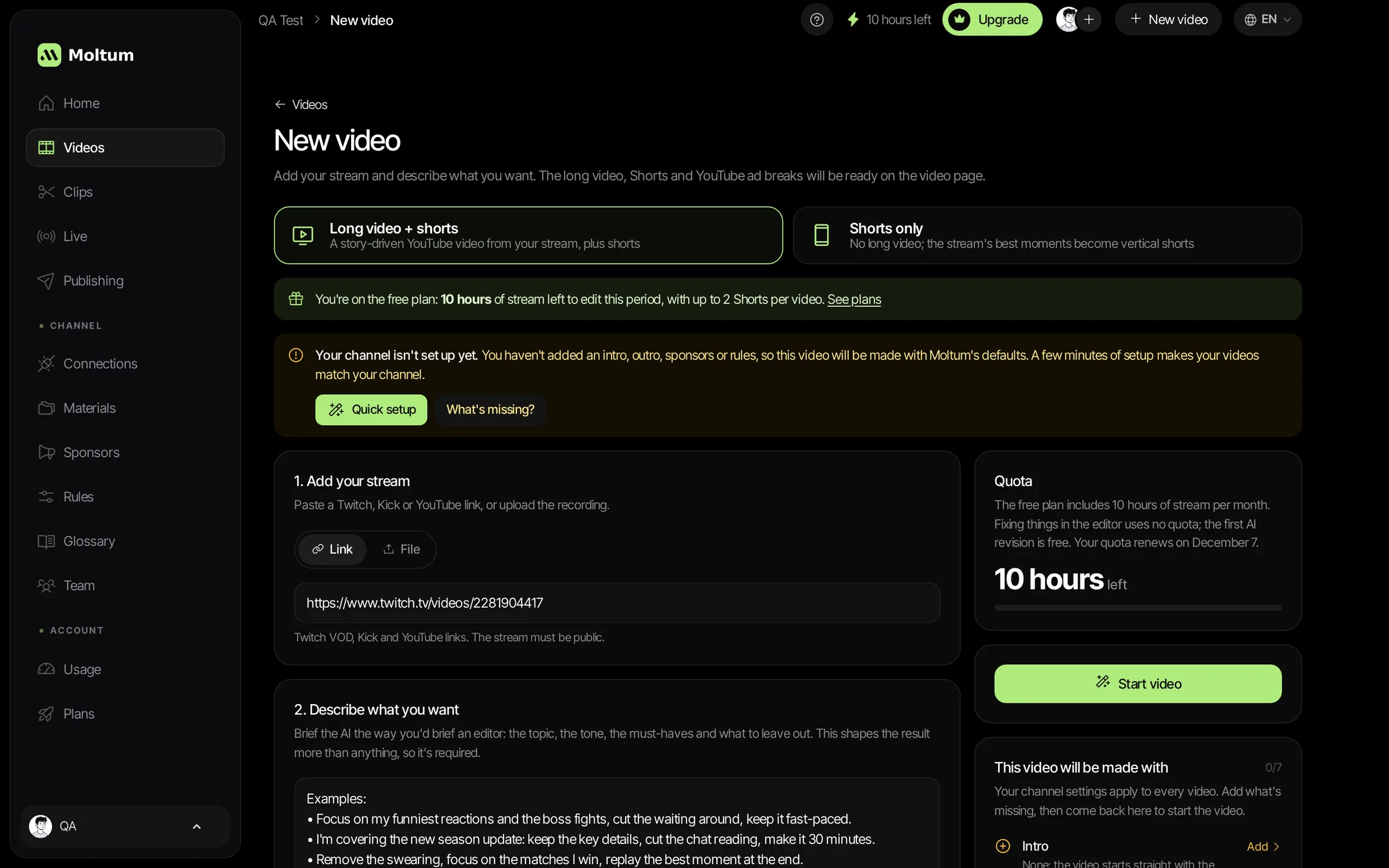
- Start: paste a Twitch, Kick or YouTube link or upload the file, write your request and pick Long video + shorts.
- Review: the video page has the long video, Shorts, thumbnail options, chapters and ad break timestamps.
- Fix: write a note and press Regenerate (the first 2 AI revisions on each video are free on paid plans, the first one on the free plan), or use Open in editor.
For streams, see Moltum for streamers.
Frequently asked questions
Is Moltum a Spikes Studio alternative?
For clips, yes: Moltum makes vertical Shorts with word-by-word captions and face cam layout. The bigger difference is that Moltum also delivers a long YouTube video edited in story order.
Which gives more hours?
Spikes Studio's PRO+ lists 300 minutes a month and Enterprise 1,200 minutes. Moltum gives 25 hours of source on Creator, 60 on Pro and 180 on Studio a month.
How do I post Moltum's Shorts?
Download the long video, the Shorts and the thumbnails from the video page and post them on any platform you like. The title, description and chapters are ready to copy.
How much can I test on Moltum's free plan?
The free plan gives 5 hours of source in total, split across up to 3 videos, with no card. That's enough to run one or two real recordings through it and compare. Free videos come out at 720p with a watermark and up to 2 Shorts each, and the first AI revision on each video is free. See Plans and quota.