Short answer: to make a good Short from your GTA 6 stream, pick one moment: a crash, a chase, a ridiculous physics glitch or your genuine reaction. Start it just before the action, end it right after your reaction, and usually keep it to 30-60 seconds. In a vertical 9:16 frame, use a camera-on-top, gameplay-below layout if you have a facecam; add word-by-word captions, turn the game audio down and your voice up, and mute any part where the radio plays a song. Nothing guarantees going viral, but a clean cut of the right moment is your best shot.
Which moments make good Shorts?
With a brand-new game, viewers are curious. Everyone is still discovering it, so even a small glitch on your stream can interest strangers. Not every funny moment makes a Short, though; the ones that do usually fit these groups:
- Crashes and fails: flying off a ramp and landing in the wrong place, a mission lost in the last second, getting caught in your own trap. Viewers sense it coming and stay for the ending.
- Chases: escaping the police, getting boxed in on a narrow street, a narrow getaway. Motion sets the pace.
- The game being weird: a ridiculous physics glitch, a pedestrian doing something unexpected, a strange scene transition. In new games these get extra curiosity.
- Genuine reactions: your first reaction to a surprise, a yell, a laugh, a stunned silence. Other players have the same crash; your reaction makes it your moment.
- “How did I do that?” moments: an unbelievable jump, a lucky shot, an impossible parking job. These are the ones people rewatch.
Our post on finding the best moments covers how to spot them in a long stream; moments when chat explodes, your voice rises and you burst out laughing are good candidates.
The context test: would a stranger get it?
Most people who see your Short don't know you and never saw the rest of the stream. So run every candidate through one question: would someone with zero context understand what's happening in the first few seconds?
- If a joke only lands when you know something you said ten minutes earlier, it's a weak Short.
- If the mission needs a long explanation to make sense, start the clip somewhere else or drop it.
- Inside jokes only your regulars get can stay in the long video; in a Short they leave new viewers out.
A good Short stands on its own; save the full story for the long video, as in our post on turning a GTA 6 stream into a story episode.
Length: start just before the action, end right after the reaction
YouTube Shorts now accepts videos up to 3 minutes, but a gameplay moment rarely needs that long. Most GTA moments fit comfortably in 30-60 seconds, and some are over in 15. For a closer look at length, read how long a YouTube Short should be.
When you pick your cut points, follow this order:
- Start: a second or two before the action. Skip getting into the car, checking the map and the long drive to the target.
- Peak: put the crash, explosion or surprise in the middle or near the end, so viewers wait for it.
- End: right after your reaction or the result. Cut when the laugh ends; don't keep the “okay, anyway” part.
- Sentences: don't cut your commentary mid-sentence. A half-finished line makes the ending feel off.
The first second: show why they should stay
In a vertical feed, moving on to the next video takes a single swipe. There should be movement in the first second: a car sliding sideways, police lights behind you, a bike spinning through the air. A Short that opens on a quiet menu or a slow walk often loses its chance right away. A short curiosity line at the top of the screen helps too, something like “I should not have taken this ramp.” More ways to build the opening are in our post on hooking viewers in the first seconds.
The vertical frame: facecam and gameplay
There are a few ways to fit horizontal gameplay into 9:16, and in GTA each has its place:
- Camera on top, gameplay below: the safest choice if you have a facecam. Your reaction and the action show at the same time; half the joke is on your face anyway.
- Center crop: works well when the car or character is in the middle of the screen. Anything at the edge, like a police car coming in from the side, can fall outside the frame.
- Blurred background: shows a wide view or a distant crash without cropping, but everything ends up small.
Watch the game's HUD as well: the minimap, wanted stars and mission text can get cut in half by a vertical crop. If important information sits there, choose the layout accordingly.
Captions and audio
Plenty of people watch Shorts with the sound low or off. Word-by-word animated captions get your reaction and your joke across to them too. Make sure character, place and vehicle names are spelled right; automatic captions easily get a new game's names wrong.
On the audio side, check two things:
- Your voice should come through: crashes and explosions are loud and can bury your commentary. Turn the game audio down a little and your voice up.
- Songs on the radio: in GTA, the car radio usually plays real, licensed songs, and those can trigger copyright claims on YouTube. Even in a short clip, mute that part or pick another moment.
Titles, posting and a bridge to the long video
Keep the title short and about the moment, but don't give away the ending. “What happened when I ran from the cops in GTA 6” leaves people curious; “My car fell off a cliff in GTA 6” spoils the surprise. Put the game's name in the title; when a new game comes out, people search for it.
One stream gives you several Shorts. Spacing them out gives each one its own chance. If you also have a long episode, you can link the Short to it in YouTube Studio, so viewers coming from the Short can move on to the full story. Check YouTube Studio for where that option currently lives.
Age restrictions and sensitive scenes
The GTA series is made for adults, and some scenes may run into YouTube's rules. Think twice before picking a moment where violence or explicit content is the main thing. If you swore on stream, make censoring part of the cut. Check YouTube's current Community Guidelines.
Doing it with Moltum
Moltum finds the strong moments in your GTA 6 stream and turns them into vertical Shorts; it doesn't generate gameplay or voices, it only cuts your own recording.
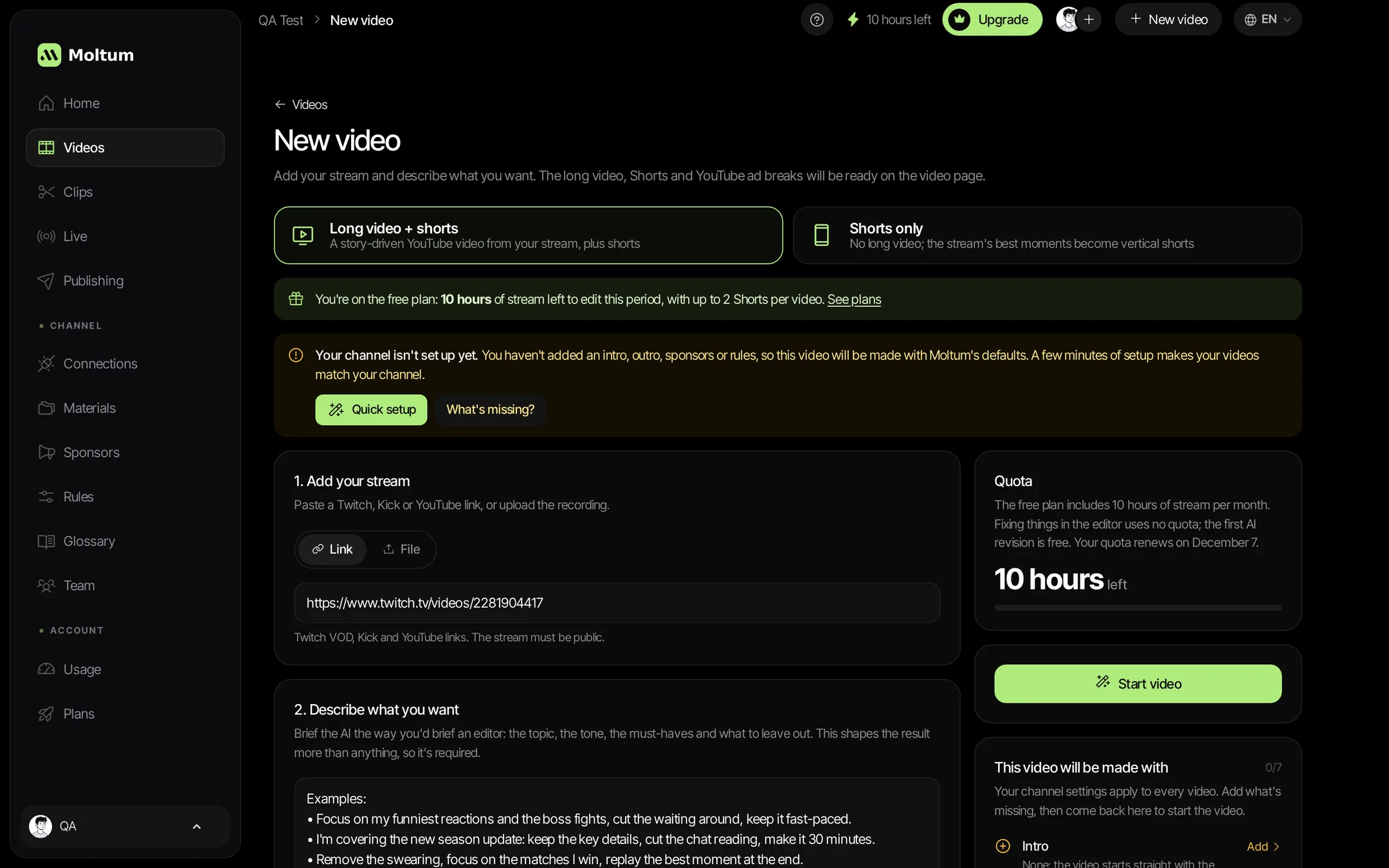
- Add the recording: paste a Twitch, Kick or YouTube link, choose Shorts only at the top of the form and pick a number under How many?.
- Layout and captions: in Rules, set Vertical layout to Camera on top, game below, and turn on Captions in the form. Add character and place names to your Glossary and they'll be spelled right in captions.
- Audio: write “turn the game audio down and my voice up” in your request; it applies to Shorts too.
- More shorts: once the video is ready, use See moments in the More shorts card to turn moments the AI left out into extra Shorts, or mark your own range in the editor's Source view and click Make a Short.
More in the Shorts and clips help page.
Frequently asked questions
How many Shorts should I make from one GTA 6 stream?
There's no fixed number: as many as there are moments that pass the context test and stand on their own. Pick your strongest few instead of padding.
Can I make Shorts without a facecam?
Yes. Use a center crop or a blurred background. Captions and your voice matter even more then, because your reaction only comes through in your voice.
Is it a problem if a radio song plays for only a few seconds?
Being short isn't a guarantee; licensed songs can trigger a claim even in a few seconds. The safest option is to mute that part or end the clip before the song starts.
Can I get both Shorts and a long video from the same recording?
Yes. A Short sells a moment; the long video tells the story. In Moltum, choose Long video + shorts at the top of the form and both are made together; Shorts can even come from moments that didn't make it into the long video.


