Short answer: Frameotter is a full video editor for Mac and Windows, with a web editor, where an AI assistant builds the edit on a multi-track timeline and you keep editing by hand. Moltum is a cloud service: you paste a stream link or upload a file, write what you want, and get back a finished, story-driven YouTube video plus Shorts, a thumbnail, chapters and a YouTube description. If you want an editor with AI help and full manual control, Frameotter fits. If you want the edit done for you, from a link, with the YouTube extras included, Moltum is built for that.
Want to see the output first? Example edit: a 2h 44m Twitch stream turned into a 20-minute video with one request (source, request, shorts and edit notes included).
What each tool makes
Frameotter: an editor with an AI assistant
Frameotter describes itself as "an AI-powered video editor for Mac and Windows, with a web editor for quick cuts". You import the recording as a file (a local OBS recording or a VOD you downloaded), and the assistant plans and makes the edit, explains its cuts and can make a YouTube video, a highlights cut or vertical Shorts with captions. The desktop app is a full editor with effects, transitions, keyframes, color grading, an audio mixer, masks and tracking, and multicam. It exports to Premiere Pro, DaVinci Resolve and Final Cut Pro (FCPXML, Final Cut Pro 7 XML, EDL, AAF, OMF and OpenTimelineIO). Its FAQ says your video stays on your computer; for analysis it uploads compressed audio and low-resolution frames, deleted after 24 hours. Music and sound effects come only from your own files.
Moltum: a finished long video plus Shorts
Moltum is an AI video editor that runs in the browser. You paste a Twitch, Kick or YouTube link or upload a file of up to 40 GB, describe what you want and choose a target length. It edits the recording into a long YouTube video in story order, makes vertical Shorts from it and adds a thumbnail, chapters, a YouTube description, ad break timestamps and subtitle files. You can fix the result with a note, in a browser timeline editor, or export it to Premiere Pro, DaVinci Resolve, Final Cut or EDL.
Side by side
| Frameotter | Moltum | |
|---|---|---|
| What it is | Desktop editor (Mac, Windows, Linux build) plus web editor, with an AI assistant | Browser-based AI editing service with a timeline editor |
| Sources | Files you import | Twitch, Kick or YouTube link, or a file upload |
| Output | Your edit: YouTube video, highlights or Shorts, rendered by you | A finished long video, Shorts, thumbnail, chapters, YouTube description |
| Free plan | Whole editor free with no time limit; AI editing for a short video a month, with a small mark on AI edits | Up to 3 videos from 5 hours of source in total, 720p with watermark, 2 Shorts per video |
| Paid plans | Hobby $15, Creator $45, Pro $150, Studio $750 a month ($10, $30, $100, $500 billed yearly); tax not included | Creator $29, Pro $59, Studio $149 a month, net + VAT |
| How usage is counted | Monthly AI editing allowance; by its estimate about 1 (Hobby), 4 (Creator) or 14 (Pro) whole edits of a 3-hour stream | Hours of source recording a month: 20, 50 or 150 |
| Export to other editors | FCPXML, FCP 7 XML, EDL, AAF, OMF, OpenTimelineIO | Premiere Pro .xml, DaVinci Resolve and Final Cut .fcpxml, EDL |
| Music | Your own files only | Your files plus a royalty-free Moltum library (music, transition sounds, meme clips) |
| YouTube upload | Not mentioned; you export the edit | Upload and schedule on YouTube (paid plans) |
Frameotter details are from frameotter.com and its plans page as shown on 27 November 2026; Moltum prices are on the pricing page. Both can change, so check before you subscribe.
When Frameotter is the better pick
- You want to edit yourself, with AI doing the first pass. A full desktop editor with color grading, keyframes, masks and multicam means you never have to leave it.
- You want your files to stay on your computer. Frameotter's FAQ says your video stays local and only compressed audio and low-resolution frames are uploaded for analysis.
- You need pro interchange formats. AAF, OMF and OpenTimelineIO exports suit post-production pipelines.
- You want a free editor. The editor itself is free with no time limit; you only pay for AI editing.
When Moltum is the better pick
- You want the edit done without editing. Write the request once; the long video and Shorts come back finished and ready to upload.
- You work from links. Paste a Twitch, Kick or YouTube link instead of downloading the VOD first.
- You stream many hours. Moltum counts source hours: Creator covers 25 hours a month for $29 net, which is about eight 3-hour streams. Frameotter's own estimate for its $45 Creator plan is about four whole edits of a 3-hour stream.
- You want the YouTube package. A thumbnail, chapters, a YouTube description, ad break timestamps and subtitle files come with every video, and paid plans can upload and schedule to YouTube.
- Stream-specific features matter. Twitch chat activity can raise a moment's priority, the profanity filter bleeps swear words, live mode makes Shorts during the stream, and sponsor videos are placed automatically on Creator, Pro and Studio.
- You want music without hunting for it. The royalty-free Moltum library fills moods you have no tracks for.
Can you use both?
Yes. Moltum's Export to your editor card gives you an .fcpxml or EDL of its cut, which you can open in an editor that reads those formats and finish there. Check that the editor you use imports the format before you rely on it.
For more tools, see the best AI tools to turn a livestream into a YouTube video.
Doing it with Moltum
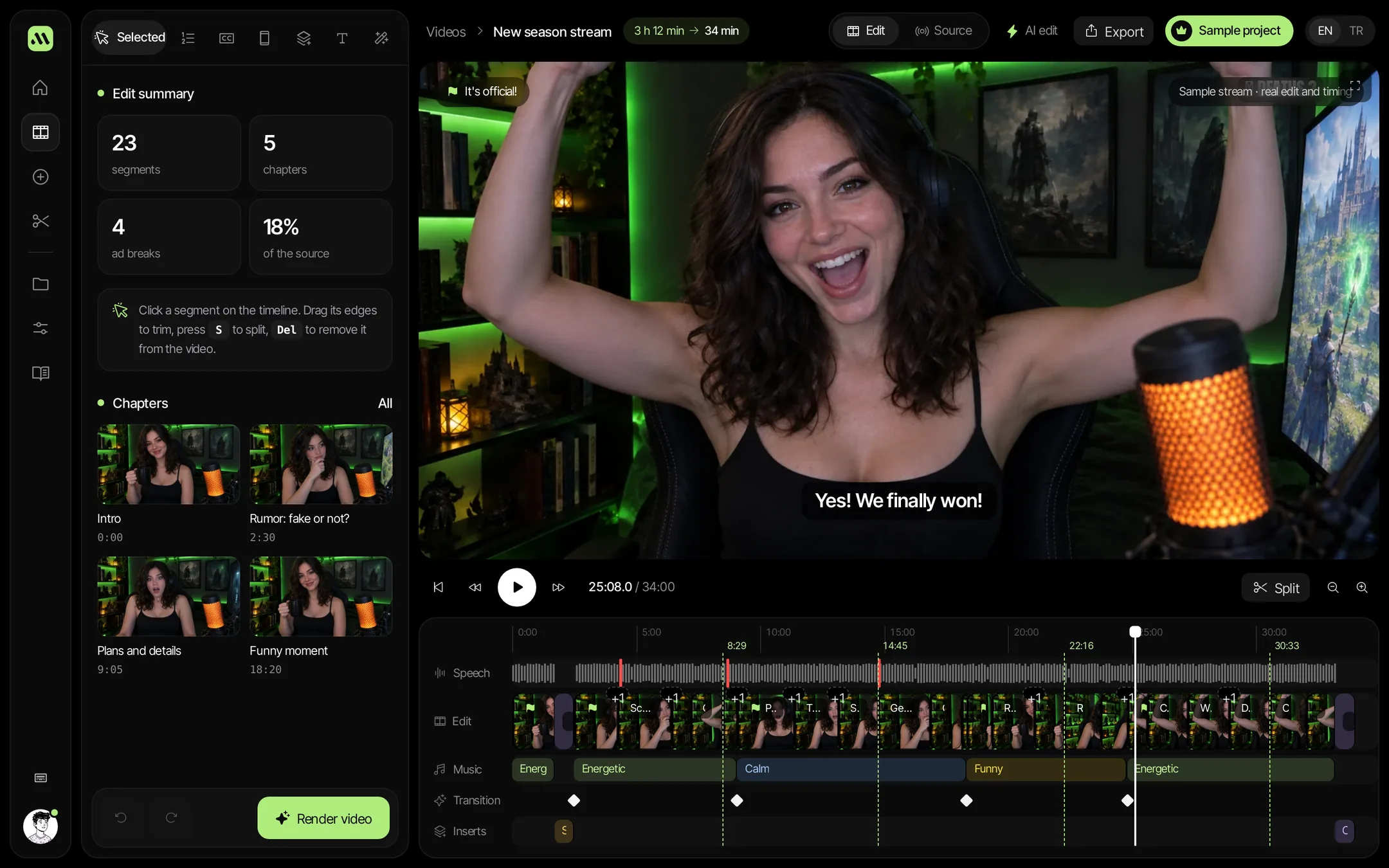
- Start: paste the link or upload the file, write your request and pick Long video + shorts.
- Fix: write a note and press Regenerate (the first AI revision on each video is free, the first 2 on paid plans), or use Open in editor.
- Finish elsewhere if you like: see Exporting to your editing software.
Frequently asked questions
Is Moltum a Frameotter alternative?
For turning a stream into a YouTube video, yes, but they work differently. Frameotter is an editor where AI does a first pass and you keep editing; Moltum delivers the finished long video and Shorts from a link or file and lets you fix them with a note or in its editor.
Does Frameotter take Twitch links?
Its stream-to-video page says you import the recording as a file: a local OBS recording or a VOD you downloaded from your channel. Moltum accepts public Twitch, Kick and YouTube links as well as uploads.
Which one is cheaper for a weekly stream?
For one 3-hour stream a week (about 13 hours a month), Moltum's Creator plan ($29 net, 25 hours) covers it. Frameotter estimates about 1 whole edit of a 3-hour stream on Hobby and about 4 on Creator ($45 a month, or $30 billed yearly).
Does Moltum keep my files on my computer?
No, Moltum works in the cloud: your recording is processed on our servers, and the finished files are kept for 30 days on paid plans (3 days on the free plan), then deleted.