Short answer: AI tools for streams fall into three groups. Clip tools such as OpusClip, Klap, Eklipse, StreamLadder and StreamGen cut short vertical clips for Shorts, TikTok and Reels. Long-form editors such as Moltum, TurboCut, AquaEdits, Frameotter and ViddyFlow cut the whole recording into one longer YouTube video. Descript and Gling help you edit a talking recording yourself, faster. If you want the stream turned into a story-driven YouTube episode plus Shorts from the same recording, with captions, a thumbnail, chapters and a YouTube upload in one place, that is what Moltum does. The table below compares what each tool makes, the free plan and the starting price.
Want to see the output first? Example edit: a 2h 44m Twitch stream turned into a 20-minute video with one request (source, request, shorts and edit notes included).
How we compared these tools
We picked the tools that come up most often when people ask for an AI editor for streams, podcasts or long recordings, including smaller tools built only for stream VODs. For each one we only used what the tool's own website says: what it produces, whether there is a free plan and what the cheapest paid plan costs. Everything was checked on each tool's own site on 27 November 2026, with prices in US dollars unless the site shows euros. Prices, limits and billing options change often, so check the current page before you subscribe.
We did not rank the tools by "quality". Edit quality depends on your footage and what you ask for, so the fairest test is your own recording. Our guide on what to look for in an AI tool that turns a livestream into a YouTube video has a checklist you can use for that test.
Comparison table
| Tool | What it makes | Free plan | Paid plans start at | Best for |
|---|---|---|---|---|
| Moltum | A story-driven long YouTube video plus vertical Shorts from your own recording | 5 hours of source in total, up to 3 videos; 720p with watermark, 2 Shorts | Creator $29/month net + VAT (25 hours of source a month) | Streamers, podcasters and vloggers who want a full episode and Shorts |
| TurboCut | A long-form edit you change by typing, plus Shorts from the same edit | First video free up to 3 hours with no watermark; then 1 hour a month, 720p, watermark | Starter $15/month (10 hours); Creator $29/month (25 hours) | Creators who want to steer a long edit with prompts and a transcript |
| AquaEdits | One long-form video from up to 5 hours of a gaming stream; editable timeline on Professional | No free plan; 7-day trial with 100 credits (card required) | Creator from $50/month (500 credits, about 5 videos) | Gaming creators who only want long-form uploads |
| Frameotter | A desktop and web editor whose AI assistant builds the edit on a timeline; long videos, highlights or Shorts | Yes: the whole editor free, AI editing for a short video a month | Hobby $15/month ($10/month billed yearly) | People who want a full editor with AI help |
| ViddyFlow | A highlight video at the length you choose plus up to 20 vertical Shorts from a Twitch VOD | 700 credits on signup, watermarked | One-time credit packs from $5 (1,000 credits), no subscription | Pay-as-you-go highlight reels |
| StreamGen | Mainly vertical clips; an AI VOD Editor (beta, Ultimate plan) makes pre-edited projects | Yes: 3 streams and 5 Shorts a month, watermark | Plus and Ultimate; the site says from €5.49/month | Streamers who want many clips and scheduled posting |
| OpusClip | Short vertical clips from long videos | Yes: 60 credits a month per its FAQ, watermarked, files kept 3 days | Starter $15/month | Creators who mainly post short clips |
| Klap | Short vertical clips from long videos | No permanent free plan; free try on 1 video (downloading needs a paid plan) | Basic $14.50/month billed yearly ($29 month to month) | Posting many clips a month |
| Eklipse | Vertical 9:16 clips from Twitch, Kick and YouTube Live streams | Free account and a preview of one stream; exporting needs Premium | Premium $24.99/month ($179.99/year) | Gaming streamers who want clips |
| StreamLadder | Vertical clips from stream clips; ClipGPT finds clips; Montage Maker joins clips | Yes: 720p 30fps exports, 200 MB uploads | Starter $15/month; ClipGPT from Creator $27/month | Streamers who want to design vertical layouts themselves |
| Descript | A text-based editor for video and audio, with AI tools; you do the editing | 1 media hour a month, 720p, watermark | Hobbyist from $16 per person/month (the page also shows $24) | People who want to edit by hand, faster |
| Gling | Cuts bad takes, silences and filler words from talking recordings; also short clips, chapters and titles | 1 hour a month, watermark | Plus $20/month ($10/month paid annually) | Talking-head YouTubers |
AI tools that edit the long video
These tools aim at the job most clip tools leave to you: turning hours of stream into one video people watch start to finish. They differ a lot in how you steer them, what you get back and how usage is counted.
Moltum
Moltum is an AI video editor for long recordings: streams, podcasts, vlogs and lessons. You paste a Twitch, Kick or YouTube link or upload a file (up to 40 GB, or up to 10 files combined into one video), describe what you want and choose a target length. It edits the recording into a long YouTube video in story order plus vertical Shorts, and adds a thumbnail, chapters, a YouTube description and ad break timestamps. It edits your own footage and does not generate video. You can fix the result with a note, in a browser editor, or export it to Premiere Pro, DaVinci Resolve or Final Cut. Quota is counted by the length of the source recording.
TurboCut
TurboCut calls itself "the AI video editor you talk to". It transcribes the recording, makes a long-form edit and lets you change it by typing instructions such as "make it ten minutes" or by deleting words in the transcript; Shorts with hooks and captions are one click from the edit. It pulls Twitch and Kick VODs by link and can auto-ingest new Twitch streams; for YouTube sources you upload the file. Plans are counted in video hours: Free 1, Starter 10, Creator 25 and Pro 50 hours a month, with 1080p60 on Creator and 1440p60 on Pro. Creator and Pro add YouTube publishing, chapters, AI thumbnails and sponsor read placement. Paid plans keep projects for as long as you have a plan. Read our Moltum vs TurboCut comparison for the details.
AquaEdits
AquaEdits is a long-form AI VOD editor for gaming creators and says it does not focus on short clips. You upload a VOD downloaded from Twitch, YouTube or Kick or an OBS recording (up to 50 GiB), mark a section of up to five hours and give a brief, a target length and a preset. Creator returns a finished MP4 up to 1080p60; Professional adds source quality and editable timelines for Premiere Pro and DaVinci Resolve. It is credit-based: 15 credits per edit, plus 20 per source hour, plus 1.5 per finished minute.
Frameotter
Frameotter is a desktop editor for Mac and Windows (with a Linux build and a web editor) whose AI assistant builds the edit on a multi-track timeline and explains its cuts. You import the recording as a file and can ask for a YouTube video, a highlights cut or vertical Shorts, then keep editing by hand with effects, color grading, an audio mixer and multicam. It exports to Premiere Pro, DaVinci Resolve and Final Cut Pro. The editor is free; you pay only for AI editing. See Moltum vs Frameotter.
ViddyFlow
ViddyFlow turns Twitch VODs into a highlight video at the length you choose plus up to 20 vertical Shorts with burned-in captions. Its AI looks at video, audio and chat, and it also writes titles, descriptions, tags and chapter lists. There is no subscription: you buy credit packs once, and the cost depends on the processing tier you pick. One-click YouTube posting is listed as coming soon.
StreamGen's AI VOD Editor
StreamGen is mainly a clip tool (see below), but its Ultimate plan includes an AI VOD Editor, marked beta, that removes silences, loading screens and menus and hands you a pre-edited project to finish in DaVinci Resolve or Premiere Pro. Ultimate includes 10 VOD edits. See Moltum vs StreamGen.
Clip tools
OpusClip
OpusClip describes itself as a tool that turns long videos into viral clips and publishes them to social platforms. Its pricing page shows Free, Starter ($15/month), Pro ($29/month) and a custom Business plan. On the free plan, exports carry a watermark, files expire after 3 days and clips are 9:16 only. The output is short clips; its pricing page does not mention a long-form video.
Klap
Klap turns long videos into short vertical clips for TikTok, Reels and Shorts, with reframing and animated captions. Plans are counted in clips: Basic 100, Pro 300 and Pro+ 1,000 clips a month. Its FAQ says source videos can run up to 3 hours. You can try it free on one video and edit the clips, but downloading them needs a paid plan.
Eklipse
Eklipse connects to Twitch, Kick and YouTube Live, finds gameplay highlights and exports vertical 9:16 clips with editable captions for TikTok, Shorts and Reels. Its help center (updated 26 November 2026) says creating an account is free and lets you preview the clips from one recent stream, but exporting needs Premium. Premium Pro ($39.99/month) adds features such as live clipping.
StreamLadder
StreamLadder started as a tool for turning a clip into a vertical video and still offers that for free. Its ClipGPT feature, on the Creator and Pro plans, finds up to 30 clips per stream and imports Twitch and Kick streams by link. Montage Maker joins edited clips into one video. Paid plans include a 7-day free trial.
StreamGen
StreamGen's AI Clip Finder ranks clips from streams of 8+ hours, its clip editor adds layouts, animated captions in 90+ languages and word censoring, and its scheduler posts to TikTok, YouTube Shorts and Instagram Reels. The free Starter plan covers 3 streams and 5 Shorts a month with a watermark; Plus and Ultimate raise the limits.
StreamCut, a newer service, also cuts Shorts from a VOD using the moments chat reacted to; its site does not list plans or prices yet.
Editors that speed up your own edit
Descript
Descript is a full editor where you edit video and audio by editing the transcript, with AI tools on top. It is not an automatic stream editor: you still make the edit, just faster. Plans are counted in media hours per person; the free plan has 1 media hour a month and watermarked 720p exports.
Gling
Gling is built for YouTubers who talk to the camera. It removes bad takes, silences and filler words, and adds features like AI short clips, chapters, titles and XML export to Premiere Pro, Final Cut Pro or DaVinci Resolve. Its pricing page notes that it works on speech, so videos with little talking may not benefit much.
What sets Moltum apart
Several of the tools above now make long videos, so here is what Moltum does that matters when you compare. Each point is described in our help center.
- Links from all three platforms: paste a public Twitch, Kick or YouTube link, or upload a file of up to 40 GB.
- Shorts while you're still live: live mode (paid plans) records the stream and turns standout moments into Shorts during the stream, then can make the long video when you finish.
- Chat as a signal: moments when Twitch chat suddenly picks up get priority (on by default, can be turned off in Rules).
- Sponsors handled for you: upload a sponsor video once and choose whether it goes into every video or rotates, and where it appears (Creator, Pro and Studio).
- A profanity filter: swear words are bleeped in the audio and can be written with asterisks in captions, using a word list for the language spoken.
- Color-coded captions: ask for it and each speaker's captions get their own color, in Shorts and in the long video.
- An AI narrator on request: ask for a documentary or funny narrator and an AI voice reads narration over gameplay moments in the long video.
- Your editor, if you want it: export the cut to Premiere Pro (.xml), DaVinci Resolve and Final Cut (.fcpxml) or any EDL editor.
- Up to 4K: 1080p60 on Creator, up to 2K (1440p60) on Pro and up to 4K (2160p60) on Studio.
- Upload and schedule on YouTube: send the video and Shorts to your channel with title, description, chapters and thumbnail, now or at a set time (paid plans).
- Your channel's rules every time: Rules, Materials (intro, outro, music), the Glossary and Learned preferences, which suggests new rules from your notes and edits.
- Revisions: write a note and the AI re-edits the video; the first AI revision on each video is free (the first 2 on paid plans), and fixes you make in the editor don't use quota.
- English and Turkish: the whole panel, help and emails are available in both.
Where others are ahead: TurboCut keeps projects while you subscribe (Moltum keeps delivered files 30 days on paid plans and 3 days on the free plan) and lets you edit by deleting words in the transcript. Moltum's free videos are 720p with a watermark.
Which one fits which job?
- You only post Shorts, TikToks and Reels: a clip tool is the simplest fit. Compare how they count usage (credits, clips or hours) against how much you stream.
- You want a long YouTube episode from each stream: pick from the long-form editors. Check how you steer the edit (a written request, prompts, a brief and presets), what you get back (a finished video or a project to finish yourself) and how fixes are counted.
- You want to edit yourself with AI help: a full editor such as Frameotter or Descript, or a take-cutting tool such as Gling, keeps you in control.
- You want everything from one recording: one tool that makes the long video, the Shorts, the thumbnail and chapters and uploads to YouTube means one upload, one request and one place to fix things.
Doing it with Moltum
Moltum turns one long recording into a story-driven YouTube video and Shorts, following the request you write.
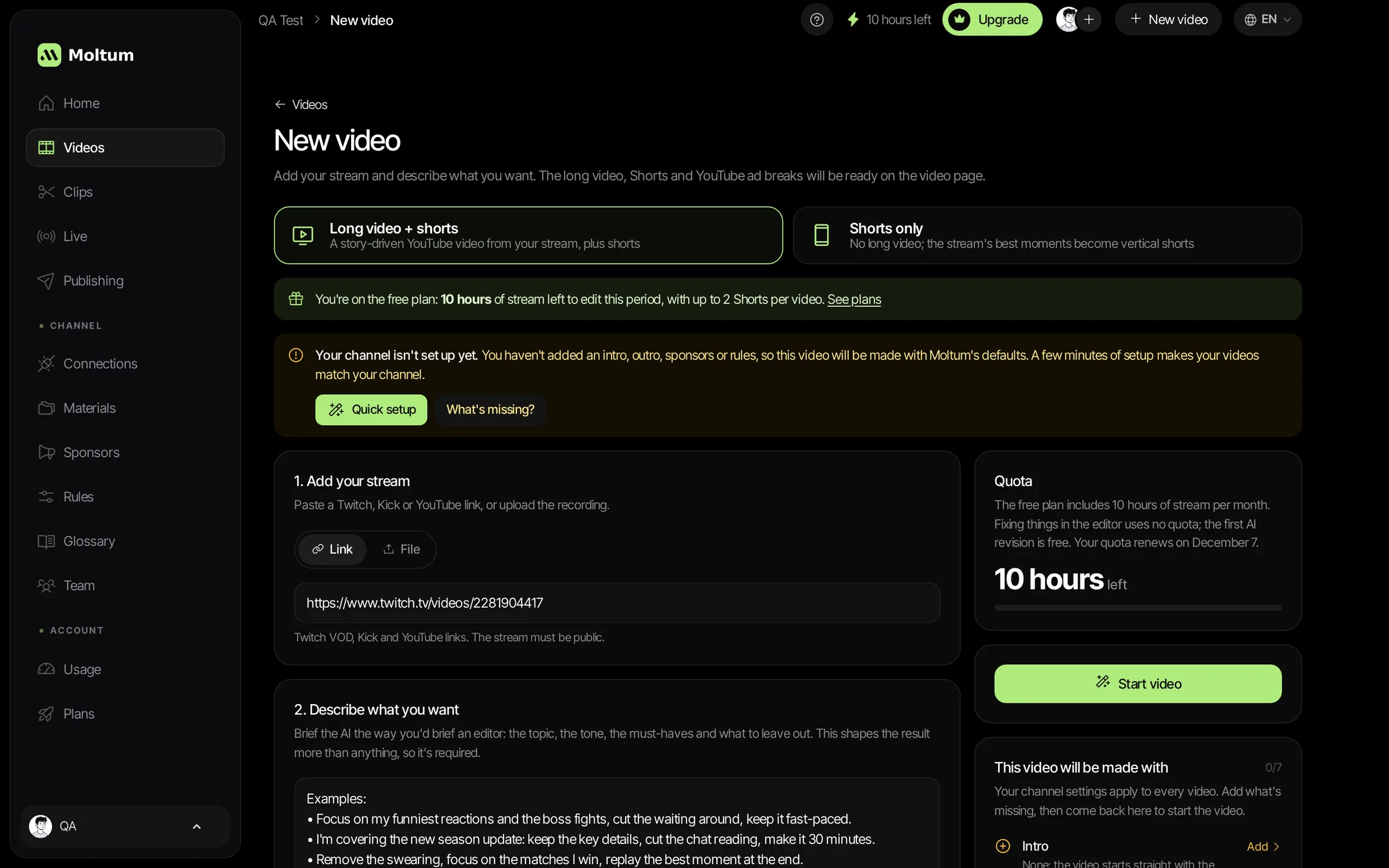
- Long video + shorts or Shorts only: pick at the top of the form, then set a Target length.
- Your channel, every time: Rules, Materials (intro, outro, music) and the Glossary apply to every video; Learned preferences suggests new rules from your notes.
- Fix without starting over: write a note and press Regenerate (the first AI revision on each video is free, the first 2 on paid plans), or use Open in editor.
Plans and limits are on the pricing page; what each Short includes is in Shorts and clips.
Frequently asked questions
Which AI tool turns a whole stream into a long YouTube video?
Moltum, TurboCut, AquaEdits, Frameotter and ViddyFlow all make a longer video from a stream, and StreamGen's Ultimate plan has a beta VOD editor that prepares a project for you to finish. They differ in output: Moltum delivers a finished long video plus Shorts, a thumbnail, chapters and a YouTube description, and can upload it to YouTube. Most popular stream tools such as OpusClip, Klap and Eklipse make short clips.
What is the difference between Moltum and TurboCut?
Both make a long edit plus Shorts. TurboCut is steered by prompts and transcript editing and gives 25 hours for $29. Moltum takes Twitch, Kick and YouTube links, makes Shorts during a live stream, exports to Premiere Pro, DaVinci Resolve and Final Cut and goes up to 4K on Studio, with 25 hours for $29 net and 60 hours on Pro for $59. See Moltum vs TurboCut.
Is there a free way to try these tools?
Most of them let you try for free, but the limits differ. Moltum's free plan gives you up to 3 videos from 5 hours of source in total, in 720p with a watermark, with no credit card. TurboCut's first video is free up to 3 hours, AquaEdits has a 7-day trial that needs a card, and some clip tools let you preview clips for free but need a paid plan to download them.
How do these tools count usage?
Differently: some count credits, some clips, some hours of media. Moltum counts the length of the source recording once per video, so a three-hour stream uses three hours, whatever the length of the finished video.
Can I finish the edit in Premiere Pro or DaVinci Resolve?
With Moltum, yes: the Export to your editor card sends the cut to Premiere Pro, DaVinci Resolve, Final Cut or any editor that reads EDL. See Exporting to your editing software. Frameotter, AquaEdits (Professional), StreamGen's VOD editor and Gling also list exports to editing software.