
Short answer: StreamGen is a clip-first tool for streamers: it finds clips in your VODs, edits them into vertical Shorts and schedules them to TikTok, YouTube Shorts and Instagram Reels. Its Ultimate plan adds a beta AI VOD Editor that hands you a pre-edited project to finish in DaVinci Resolve or Premiere Pro. Moltum edits the whole stream into a finished, story-driven YouTube video and makes Shorts from the same recording. If short clips and scheduled posting are your main job, StreamGen fits. If you want the long YouTube video done for you, Moltum is built for that.
Want to see the output first? Example edit: a 2h 44m Twitch stream turned into a 20-minute video with one request (source, request, shorts and edit notes included).
What each tool makes
StreamGen: clips, a clip editor and a scheduler
StreamGen's AI Clip Finder analyzes every minute of a VOD, ranks clips by shareability and works on streams of 8+ hours. Its clip editor adds smart layouts, animated captions in 90+ languages, silence removal, AI title hooks, word censoring and brand presets. The scheduler publishes clips to TikTok, YouTube Shorts and Instagram Reels, and Autopilot automates the clip-to-post workflow. On the Ultimate plan, the AI VOD Editor (beta) removes silence, loading screens and menu navigation and leaves you a video "ready to be edited in Premiere Pro or DaVinci Resolve"; the pricing page lists 10 VOD edits on Ultimate.
Moltum: a long YouTube video plus Shorts
Moltum is an AI video editor for long recordings. You paste a Twitch, Kick or YouTube link or upload a file, describe what you want and choose a target length. It edits the stream into a long YouTube video in story order, cutting waiting screens, menus and dead air, and makes vertical Shorts from the same recording. You also get a thumbnail, chapters, a YouTube description, ad break timestamps and subtitle files, and you can export the cut to Premiere Pro, DaVinci Resolve or Final Cut if you want to finish it yourself.
Side by side
| StreamGen | Moltum | |
|---|---|---|
| Main output | Vertical clips; pre-edited VOD projects on Ultimate (beta) | A finished long YouTube video plus vertical Shorts |
| Sources | Twitch VODs (the site also lists Kick and YouTube); uploaded videos on Ultimate | Twitch, Kick or YouTube link, or an upload of up to 40 GB |
| Free plan | Starter: 3 streams and 5 Shorts a month, 1080p export, watermark | Up to 3 videos from 5 hours of source in total, 720p with watermark, 2 Shorts per video |
| Paid plans | Plus and Ultimate; the site says plans start from €5.49 a month (another page says €8), with 45% off yearly | Creator $29, Pro $59, Studio $149 a month, net + VAT |
| How usage is counted | Streams per month (3, 60 or 150), clips per stream; VOD edits on Ultimate | Hours of source recording a month (20, 50 or 150) |
| Posting | Scheduler for TikTok, YouTube Shorts and Instagram Reels (Plus and Ultimate) | Upload and schedule the long video and Shorts on YouTube (paid plans) |
| Finishing elsewhere | VOD Editor projects for DaVinci Resolve and Premiere Pro (Ultimate) | Premiere Pro, DaVinci Resolve, Final Cut or EDL on every video |
StreamGen details are from streamgen.cc and its pricing page as shown on 27 November 2026; prices there were shown in both dollars and euros, so check the current page. Moltum prices are on the pricing page.
When StreamGen is the better pick
- Shorts are your main content. A clip finder, a clip editor with many caption styles and a scheduler in one place cover a short-form routine well.
- You post to TikTok and Reels too. StreamGen's scheduler publishes to TikTok, YouTube Shorts and Instagram Reels. Moltum uploads directly to YouTube; for other platforms you download the files.
- You want a low monthly price. StreamGen's site lists paid plans from a few euros a month, below Moltum's $29 Creator plan.
- You want to edit the long video yourself, with a head start. The VOD Editor's pre-cut project suits editors who want silence and menus gone but the creative edit left to them.
- You want montages and best-ofs from clips. Ultimate includes a montage editor and a Best-Of Maker.
When Moltum is the better pick
- You want a finished YouTube episode. Moltum delivers the long video ready to upload, in story order with complete sentences, not a project to finish.
- You want to describe the edit. Write "keep the heist and the chase, cut the queue, 20 minutes" and the AI follows it; anything that couldn't be done shows up under Not applied, with the reason.
- You want the YouTube extras too. A thumbnail, chapters, a YouTube description, ad break timestamps and SRT/VTT subtitle files come with every video.
- You want Shorts while you're live. Live mode (paid plans) turns standout moments into Shorts during the stream and can make the long video when you finish.
- You have sponsors. Upload a sponsor video once; Moltum places it in every video or in rotation, where you choose (Creator, Pro and Studio).
Using both
Some streamers use a clip tool for daily Shorts and a long-form editor for the weekly YouTube episode. Moltum also makes Shorts (2 on the free plan, 5 on Creator, 10 on Pro, unlimited on Studio, per video), with word-by-word captions and a face cam on top when there is one, so try it on one stream first and see whether its Shorts cover what you need before paying for two tools.
For the full list of tools, see the best AI tools to turn a livestream into a YouTube video.
Doing it with Moltum
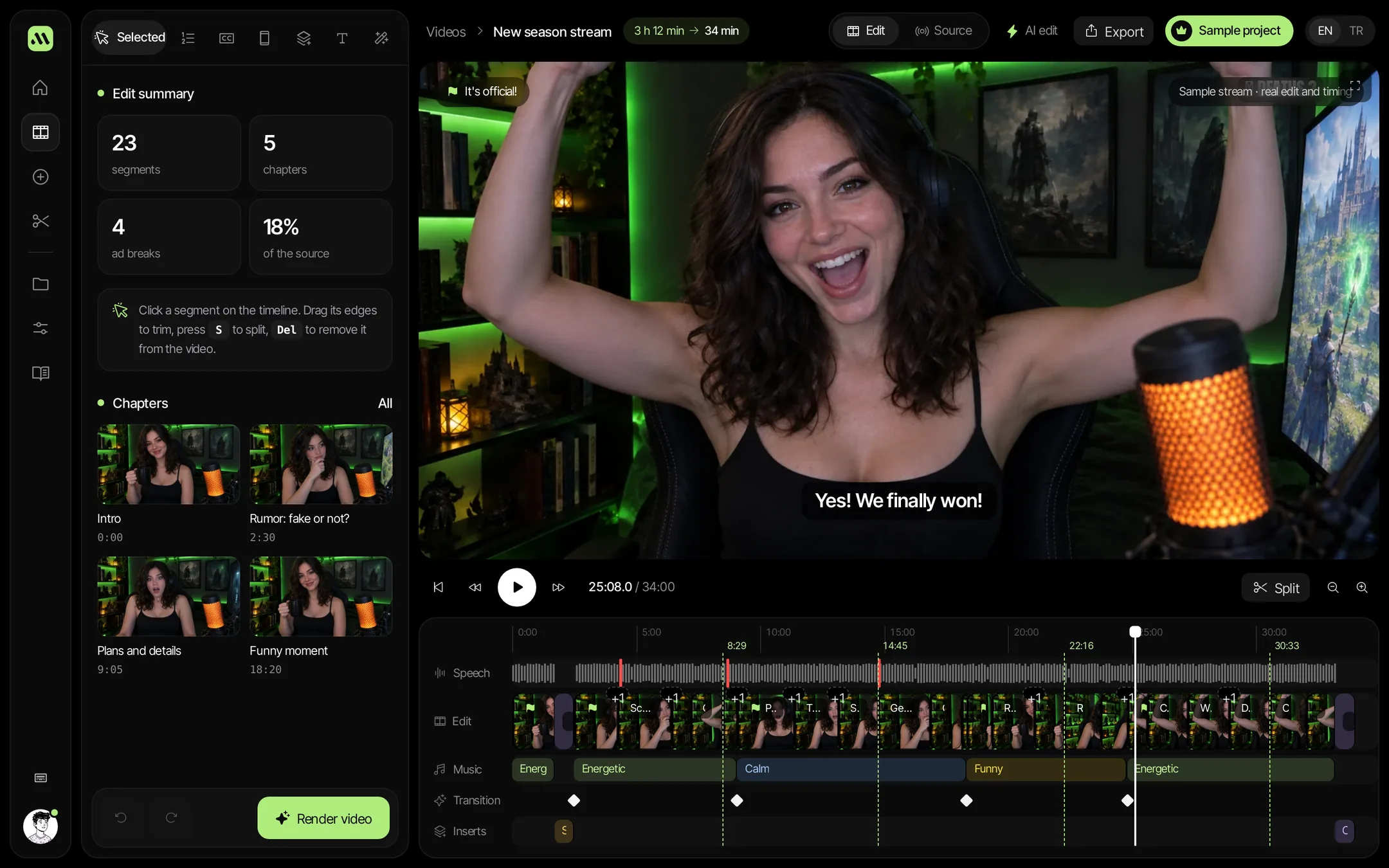
- Start: paste the link or upload the file, write your request and pick Long video + shorts.
- Review: the video page has the long video, Shorts, thumbnail options, chapters and ad break timestamps.
- Fix: write a note and press Regenerate (the first AI revision on each video is free, the first 2 on paid plans), or use Open in editor.
Frequently asked questions
Is Moltum a StreamGen alternative?
For stream Shorts, yes: Moltum makes vertical Shorts from your streams too. The main difference is that Moltum delivers a finished long YouTube video, while StreamGen's VOD Editor gives you a pre-edited project to finish in your editing software.
Does StreamGen make long YouTube videos?
Its Ultimate plan includes an AI VOD Editor, marked beta, that turns streams into edited long-form projects for DaVinci Resolve or Premiere Pro, with 10 VOD edits included. Its main focus is clips and scheduled posting.
Which one has a free plan?
Both. StreamGen's free Starter plan covers 3 streams and 5 Shorts a month, with a watermark. Moltum's free plan gives up to 3 full videos from 5 hours of source in total, with up to 2 Shorts each, in 720p with a watermark, and no credit card.
Can Moltum post to TikTok?
Moltum's direct upload is to YouTube, with scheduling. For TikTok or Reels, download the Shorts from the video page and post them yourself.