
Short answer: TurboCut and Moltum do the same core job: both turn a long recording, such as a stream or podcast, into a long YouTube edit plus Shorts. They differ in how you steer them and what comes around the edit. TurboCut is built around talking to the editor and editing the transcript, and gives 25 hours for $29. Moltum takes Twitch, Kick and YouTube links, can make Shorts while you're still live, handles sponsors, profanity and color-coded captions, exports to Premiere Pro, DaVinci Resolve and Final Cut, and goes up to 4K on Studio (25 hours for $29 net; 60 hours on Pro for $59). The rest of this page shows where each one fits better.
Want to see the output first? Example edit: a 2h 44m Twitch stream turned into a 20-minute video with one request (source, request, shorts and edit notes included).
What each tool makes
TurboCut: a long edit you direct by typing
TurboCut describes itself as "the AI video editor you talk to". It transcribes the whole recording, plans a long-form cut and returns it with the cuts made. You then change it by typing, for example "make it ten minutes" or "start on the best moment, not the intro", and it re-plans the whole edit. You can also open the transcript and delete words to cut them. One click on Find clips turns moments from the edit into vertical Shorts with hooks, titles and word-timed captions. You pick the kind of video when you upload (podcast, tutorial, talking head or gameplay).
Moltum: a finished long video plus Shorts from one request
Moltum is an AI video editor for long recordings. You paste a Twitch, Kick or YouTube link or upload a file, write what you want in your own words (what to keep, what to cut, the tone) and choose a target length. It edits the recording into a long YouTube video in story order and makes vertical Shorts from the same recording, along with a thumbnail, chapters, a YouTube description, ad break timestamps and subtitle files. You fix things with a note (the AI re-edits the video) or in a browser timeline editor.
Side by side
| TurboCut | Moltum | |
|---|---|---|
| Main output | A long-form edit plus Shorts from it | A long YouTube video plus vertical Shorts |
| Sources | MP4 upload up to 30 GB; Twitch and Kick VOD links; Twitch auto-ingest. YouTube sources must be uploaded as a file | Twitch, Kick or YouTube link, or an upload of up to 40 GB (mp4, mkv, mov, flv, ts, webm); up to 10 files combined into one video |
| How you steer it | Typed instructions and transcript editing | A written request and target length; revision notes; a timeline editor |
| Free plan | First video free up to 3 hours, no watermark; then 1 hour a month, up to 60 minutes per video, 720p with watermark | Up to 3 videos from 5 hours of source in total, 720p with watermark, 2 Shorts per video |
| Paid plans | Starter $15 (10 h), Creator $29 (25 h), Pro $59 (50 h) a month | Creator $29 (25 h), Pro $59 (60 h), Studio $149 (180 h) a month, net; a 5% payment fee and VAT are added at checkout |
| Top quality | 1080p30 Starter, 1080p60 Creator, 1440p60 Pro; 4K on request | 1080p60 Creator, up to 1440p60 Pro, up to 4K (2160p60) Studio |
| Fixes and new versions | AI edits included each month (30 Free, 60 Starter, 150 Creator, 500 Pro) | First AI revision on each video free, later ones use 20% of the source length; editor fixes and re-renders use no quota |
| Storage | Free 14 days; paid plans keep projects while you have a plan (untouched raw sources deleted after 90 days) | Delivered files kept 30 days on paid plans, 3 days on the free plan; the uploaded source 7 days on Creator, 15 on Pro, 30 on Studio |
| YouTube publishing | Creator and Pro | All paid plans, with scheduling |
| Export to editing software | Not mentioned on its site | Premiere Pro (.xml), DaVinci Resolve and Final Cut (.fcpxml), EDL |
TurboCut details are from turbocutai.com as shown on 27 November 2026; Moltum prices and limits are on the pricing page and in Plans and quota. Both can change, so check before you subscribe.
Features both have
- Chat as a signal: both look at Twitch chat; moments when chat picks up get priority.
- Swear bleeps: both can bleep swearing in the audio and hide it in captions.
- Sponsor reads: TurboCut places an uploaded sponsor read (Creator and Pro). Moltum's Sponsors page places sponsor videos in every video or in rotation, at the position you choose (Creator, Pro and Studio).
- YouTube extras: both make chapters, titles, descriptions and AI thumbnails (TurboCut lists these on Creator and Pro; Moltum's plans include AI thumbnails on every plan, free included).
- Learning your style: TurboCut lists "learns your editing style" on Creator and Pro. Moltum's Learned preferences suggests new channel rules from your ratings, notes and edits.
- Other aspect ratios: TurboCut Pro exports 16:9, 9:16 and 1:1 from one edit. Moltum can also deliver the long video as square (1:1) and 4:5 when you ask or turn it on in Rules.
When TurboCut is the better pick
- You want a smaller plan. At $29 both give 25 hours a month, but TurboCut also has a $15 plan with 10 hours, and Moltum has no plan below Creator.
- You like editing by text. Deleting words in the transcript to cut them is TurboCut's core editing model. Moltum's editor is a timeline, with captions you can search and fix.
- You revise a lot. TurboCut counts AI edits per month instead of charging hours for each new version. On Moltum's paid plans, AI revisions after the first two on a video use part of your quota.
- You want to keep projects long term. TurboCut keeps exports while you subscribe. Moltum deletes delivered files after 30 days on paid plans (3 days on the free plan), so you download or upload them before then.
- You want B-roll or voice fixes. TurboCut offers stock B-roll (Creator and Pro), AI-generated B-roll and voice retakes for flubbed lines (Pro). Moltum edits your own footage and doesn't add B-roll.
- You want a no-watermark free test. TurboCut's first video is free with no watermark. Moltum's free videos are 720p with a watermark.
When Moltum is the better pick
- Your VODs are on YouTube. Moltum takes a public YouTube link as well as Twitch and Kick, so you don't have to download and upload the file.
- You want Shorts during the stream. Live mode (paid plans) records while you're live and turns standout moments into Shorts as the stream goes on; when you finish it can also make the long video.
- You finish in Premiere Pro, DaVinci Resolve or Final Cut. The Export to your editor card gives you a project file with the cuts and chapter and ad break markers.
- You need 4K or a team. Studio goes up to 4K and includes a 5-person team; Pro includes an editor seat. On TurboCut, 4K and team plans are by contact.
- You want to describe the edit once. Write the whole request up front ("keep the boss fight and the chat argument, cut the queue, 20-30 minutes"); anything that couldn't be done shows up under Not applied with the reason.
- You want more from the audio and captions. Ask for color-coded captions and each speaker gets their own color; ask for a documentary or funny narrator and an AI voice adds narration to gameplay moments; translated subtitle files come in up to 5 languages.
- Your channel has fixed rules. Rules, Materials (your intro, outro, music and transition sounds, plus a royalty-free Moltum library) and the Glossary apply to every video without repeating yourself.
- You want the panel in Turkish. Moltum's panel, help and emails are in English and Turkish.
Pricing in practice
Both tools count hours of footage, not finished minutes. Take a streamer with three four-hour streams a week, about 52 hours a month. That's over TurboCut's 50-hour Pro plan, where you could turn on its opt-in overage ($4 an hour); Moltum's Pro plan gives 60 hours for the same $59, so it covers it, and Studio (180 hours) is there for more. For a streamer doing one long stream a week, both Creator plans cover it. Remember that Moltum's prices are net: a 5% payment network fee and your country's VAT are added at checkout. TurboCut says checkout may show your local currency at the day's rate.
How to test both on the same stream
- Pick an ordinary stream, not your best one, and note three or four moments that must be in the video.
- Give the same instructions to both: what to keep, what to cut, how long.
- Watch both long videos to the end. Do the moments connect, are sentences complete, is the opening strong?
- Compare the Shorts: hook, captions and face cam framing.
- Ask each for one change and see how easy it is to get exactly what you meant.
For more on what to check, see the best AI tools to turn a livestream into a YouTube video.
Doing it with Moltum
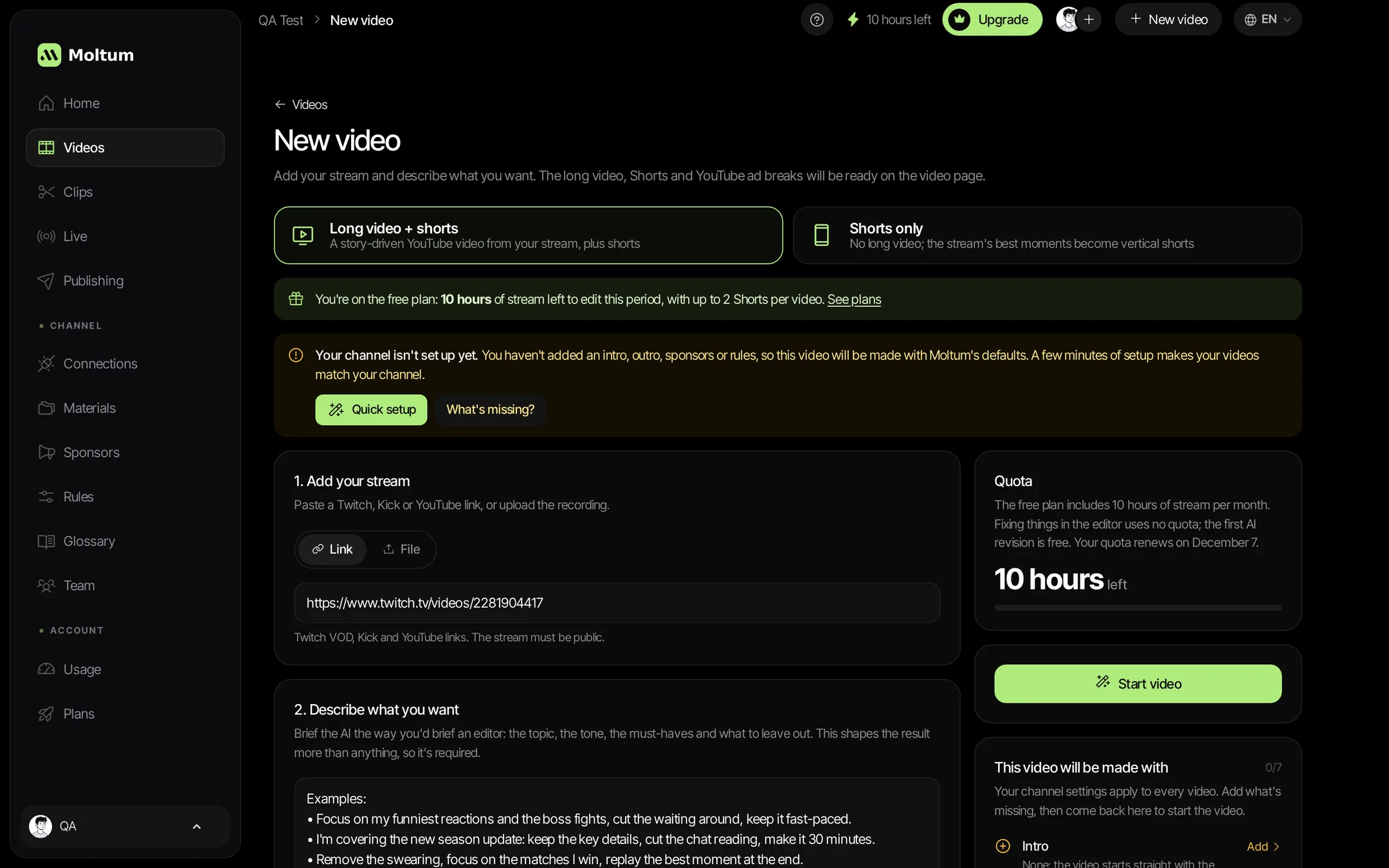
- Start: paste a Twitch, Kick or YouTube link or upload the file, write your request and pick Long video + shorts.
- Review: the video page has the long video, Shorts, thumbnail options, chapters and ad break timestamps.
- Fix: write a note and press Regenerate (the first AI revision on each video is free, the first 2 on paid plans), or use Open in editor.
- Publish: upload to YouTube now or schedule it, or download the files.
Frequently asked questions
Is Moltum a TurboCut alternative?
Yes. Both edit a long recording into a long YouTube video and make Shorts from it. Moltum is steered by a written request and revision notes rather than chat-style prompts, and adds live-mode Shorts, YouTube links, exports to editing software and up to 4K on Studio.
Which one gives more hours for $29?
TurboCut's Creator plan lists 25 hours a month at $29. Moltum's Creator plan is also $29 net with 25 hours a month, plus a 5% payment fee and VAT. Pro is $59 on both: 50 hours on TurboCut, 60 on Moltum.
Can I use a YouTube VOD with either tool?
TurboCut's site says YouTube blocks automated downloads, so you upload the file instead. Moltum accepts a public YouTube link directly, as well as Twitch and Kick links and file uploads.
How long are my videos kept?
On TurboCut's paid plans, projects are kept while you have a plan, and raw sources untouched for 90 days are deleted. On Moltum, delivered files are kept 30 days on paid plans and 3 days on the free plan; the uploaded source is kept 7 days on Creator, 15 on Pro and 30 on Studio. The period counts from the last time the video became ready.
Can I finish the edit in Premiere Pro or DaVinci Resolve?
With Moltum, yes: export the cut as .xml for Premiere Pro, .fcpxml for DaVinci Resolve and Final Cut, or EDL. See Exporting to your editing software. TurboCut's site doesn't mention project exports; it lets you download the finished files.